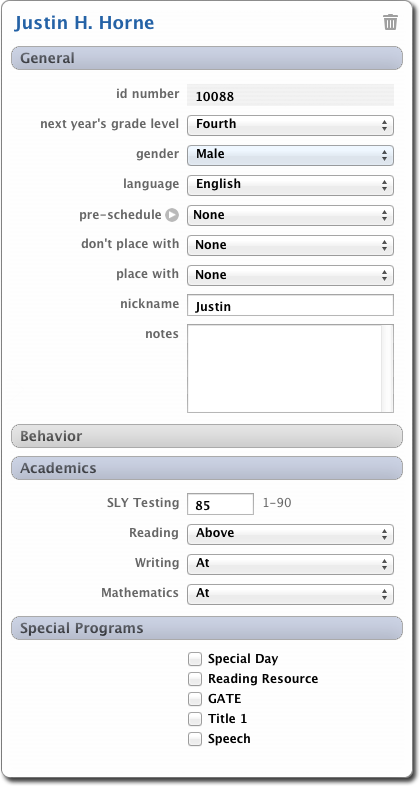
Each student has a Placement Card. This card contains information and placement criteria for the student. The Placement Card can be customized for your school and/or district.
ACCESSING THE PLACEMENT CARD
To open any student's placement card, simply double-click their name. Easy!
Once the placement card is opened, you can edit any of the data for the student.
Teachers can also edit the Student Placement card in Report Card Maker. After logging in to RCM, choose Options ClassMaker Placement Cards.
GENERAL INFORMATION
The first portion of the card is labeled General. This area contains the student's Name, ID Number, Grade Level, Gender, and Language.
Pre-Schedule / Out-Schedule - You can define if the student will be pre-scheduled into a specific student's class, or out-scheduled out of a teacher's class. For example, if you want Jimmy to be in Ms. Smith's class, then you would choose Pre-Schedule. On the other hand, if you want to make sure that Jimmy is never in Ms. Smith's class, you would choose Out-Schedule.
Don't Place With - You can select students that you don't want this student to be placed with. You would use this option to make sure that Jimmy and Billy never get placed in the same classroom.
Place With - Use this option to select students that you want this student to be placed with. For example, the parent requests that the twins get placed in the same classroom.
Notes - Just a place to write a note about the student.
DISTRICT/SCHOOL CUSTOM AREAS
Any and all areas below the General Information section are "custom". They are created and maintained by your school or district officials.
DELETING A STUDENT
You can delete a student by clicking the trash can icon at the top-right of the student's placement card. Student's that have been deleted can be restored (reinstated) by choosing File Deleted Students.