- support@clearvisiontech.com
- (909) 484-2052


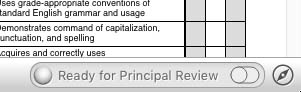
REVIEW STATUS MODES
There are five color-coded Principal Review modes:
 Not Ready - You are not ready to have your cards reviewed.
 Waiting For Review - You have indicated that you are ready for review, but the principal has not yet reviewed them.
 In Review - The principal is currently reviewing your report cards.
 Review Complete - The principal has completed the review.
 Review Complete With Notes - The principal has completed the review and there are notes for you to review.
SETTING THE REVIEW STATUS
When you're report cards are complete, click the toggle switch to enable the "Waiting for Review" status. While the status is "Waiting for Review", you can change it back to "Not Ready" by clicking the toggle switch to the off position.
Once your principal changes your status to "In Review", you can no longer change the Review Status.
Your principal should reset your status back to "Not Ready" at the beginning of each reporting period. If she doesn't, give her a gentle reminder.